Securing the digital assets of an organization must be a top priority in this age of cloud and mobile workspaces. Cybersecurity for Office 365 has been the platform of choice for many organizations to collaborate, communicate & automate. Office 365 has a host of offerings for every organization which strives for a presence in the cloud. With the vast range of abilities comes the responsibility to protect and preserve an equally diverse set of intellectual property and organizational content. Office 365 therefore has an exhaustive feature set which caters to the security and compliance needs of the customers. This post targets to touch upon the most pertinent of these features and give an overview of their capabilities.
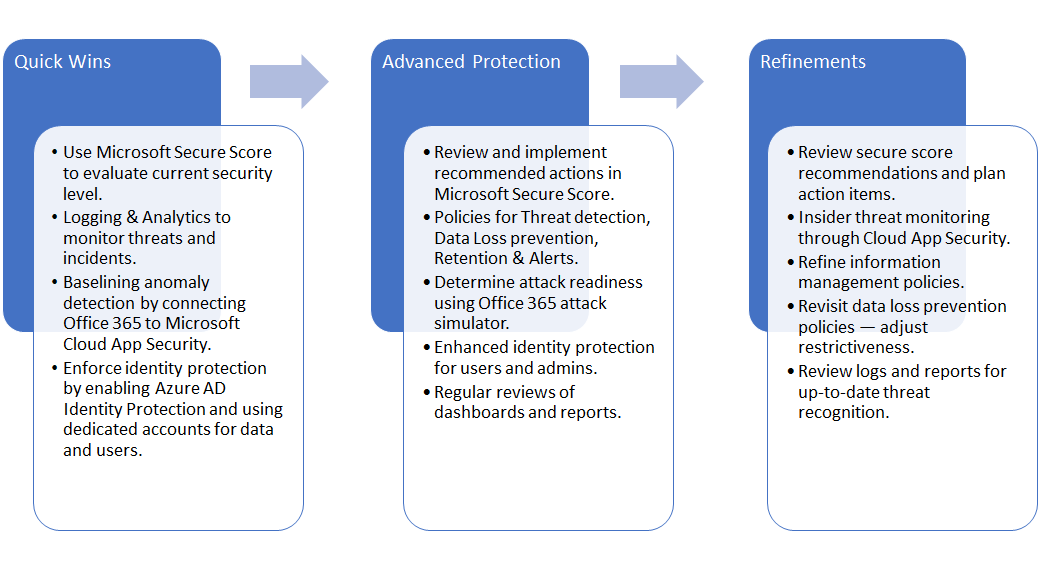
Security Road Map
Organizations view security and compliance as more of a journey rather than a goal. Microsoft recommends a basic road map which the organizations can customize and build upon to protect their Office 365 environments.
Microsoft Secure Score
Secure score is a tool available to specific Office 365 subscriptions to help determine how secure an organization’s O365 environment is. It compares settings across Office 365 offerings such as SharePoint, Exchange, OneDrive against a baseline established by Microsoft. Recommendations are then provided to align an organization’s policies with best practices in each segment. It also provides historical analysis to help an organization track the effectiveness of the steps it has taken to enhance security.
Office 365 Attack Simulator
This is part of the Office 365 Advanced Threat Protection and helps an organization to identify vulnerabilities before real attacks and address them. It lets security analysts and administrators to run real time attack scenarios such as Display name spear-fishing attacks, password-spray attacks, brute-force password attacks.
Security & Compliance Center
The security and compliance center in Office 365 allows administrators to view dashboards and reports to analyse threat detection and plan to mitigate the associated risks, create and manage policies for protection against various threats, manage alerts and supervision policies to be notified in case of threat detection. Administrators can configure various aspects of security pertaining to the Office 365 environment, such as:
- Data Loss Prevention (DLP) – Allows the admins to identify sensitive information and put in place policies to protect loss of such information.
- Data Classification – Allows for data to be classified based on sensitivity and retention needs.
- Data Governance – Deals with import, retention and disposal of data from sources such as Exchange mailboxes.
- Alerts – Allows administrators to create alert policies for specific threat scenarios and review historical alerts and trends.
- Threat Management – Offers several capabilities for administrators to detect and prevent security breaches. These capabilities include Dashboard, Mail Filtering, Anti-Malware, Domain Key Identified Mail (DKIM), Safe Attachments, Safe Links, Quarantine and Advanced Threat Protection reports.
Several of the features described above are still evolving and might not be available to all tenants. However, with these in the arsenal of the Office 365 administrators and security analysts, threat detection, analysis and mitigation gets a definite boost.