
Overview
Microsoft Graph acts as the intelligent data engine behind Microsoft 365, connecting data across emails, documents, users, meetings, and applications. It analyzes relationships and activity signals to understand how people work, enabling smarter workflows, automation, and AI-driven insights across tools like Microsoft Teams, SharePoint Online, and OneDrive for Business.
Office Delve builds on this intelligence by delivering personalized content and insights directly to users. It surfaces relevant documents, highlights collaboration patterns, and simplifies information discovery without manual searching. Together, Microsoft Graph and Office Delve enhance collaboration, improve document visibility, and boost productivity by seamlessly connecting people, content, and workflows across the organization.
Microsoft Graph: The Intelligent Data Layer of Microsoft 365
Microsoft Graph is a unified API endpoint that connects data, services, and insights across Microsoft 365, Windows, and Microsoft Entra ID. It represents a network of interconnected data—users, emails, files, devices, and teams—enabling developers and organizations to build intelligent, context-aware applications.
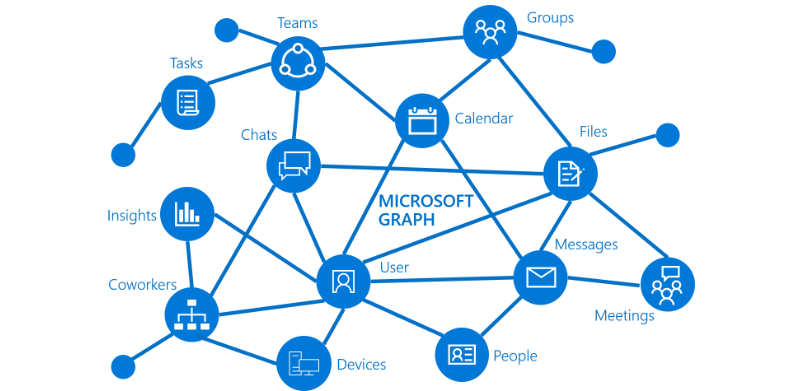
It acts as a centralized intelligence layer that transforms raw organizational data into meaningful insights, helping businesses improve productivity, collaboration, security, and automation.
How Microsoft Graph Works
- Unified API Endpoint: Microsoft Graph provides a single REST API endpoint (https://graph.microsoft.com) to access data across multiple services such as Microsoft Teams, SharePoint Online, OneDrive for Business, and Outlook. This eliminates the need to integrate separate APIs for each service.
- Data Representation: Data is structured as resources (users, groups, messages, files) connected through relationships. For example, a user can belong to a team, edit a document, attend a meeting, or report to a manager. These relationships create a contextual graph of your organization.
- External Data Integration: Using Graph Connectors, organizations can bring external data sources such as CRM systems, databases, or third-party tools into Microsoft Graph. This makes all enterprise data searchable and accessible through Microsoft Search.
- Built-in Intelligence: Microsoft Graph uses machine learning to analyze user activity, collaboration patterns, and content interactions. It identifies relevant documents, suggests collaborators, and powers intelligent features across Microsoft 365.
Key Benefits of Microsoft Graph
- Enhanced Productivity & Collaboration: Enables users to quickly access relevant documents, emails, and conversations. It integrates seamlessly with Microsoft 365 tools, reducing time spent searching for information and improving teamwork efficiency.
- Unified Development Platform: Provides developers with a single API, SDKs, and tools to build applications across the entire Microsoft ecosystem. This simplifies development and accelerates deployment of business solutions.
- Advanced Analytics & Insights: Provides valuable insights into user behavior, communication patterns, and collaboration trends, helping organizations optimize workflows and improve team performance.
- Security & Compliance: Acts as a centralized gateway for identity and security data by integrating with Microsoft Entra ID and Microsoft Defender, ensuring secure access control, threat detection, and compliance management.
- Customization & Automation: Enables organizations to automate repetitive tasks, build custom workflows, and create tailored applications that align with specific business needs.
Real-World Use Cases
- Smart Meeting Preparation: Automatically aggregates relevant documents, previous conversations, attendee details, and calendar insights to help users prepare effectively for meetings.
- Intelligent Document Discovery: Surfaces relevant files based on user activity and collaboration signals, eliminating the need to manually search across multiple platforms.
- Workflow Automation: Automates business processes such as creating tasks from emails, sending alerts on file updates, and synchronizing data across systems.
- Employee Onboarding: Helps new employees quickly discover relevant documents, teams, and resources based on their role and department.
- Enterprise Search Optimization: Enhances organizational search by enabling a unified search experience across Microsoft and external data sources.
- Sales and Customer Insights: Provides sales teams with contextual customer data, documents, and communication history to improve engagement and conversion.
Why Microsoft Graph Matters
Microsoft Graph is essential for modern digital workplaces where data is distributed across multiple tools and platforms. By connecting and analyzing this data, it eliminates silos, enhances collaboration, and enables intelligent decision-making.
It transforms how organizations interact with their data by making it more accessible, contextual, and actionable, ultimately improving efficiency and business outcomes.
FAQs
Q1: What is Microsoft Graph?
Microsoft Graph is a unified API that connects data across Microsoft 365 services. It enables organizations to access, analyze, and automate workflows using data from emails, files, users, and calendars in a centralized way.
Q2: What does Office Delve do?
Office Delve helps users discover relevant documents and information using AI-driven insights. It surfaces content based on user activity, collaboration patterns, and relevance without requiring manual searches.
Q3: How are Microsoft Graph and Delve related?
Microsoft Graph collects and analyzes data, while Delve presents that data to users in a meaningful way. Graph powers Delve’s intelligence and recommendations.
Q4: Is Office Delve secure?
Yes, Delve respects existing permissions. Users can only see documents they already have access to, ensuring data security and compliance.
Q5: How does Microsoft Graph improve productivity?
It automates workflows, connects data across tools, and provides intelligent recommendations, reducing time spent searching for information.
Q6: Can Microsoft Graph integrate with other apps?
Yes, developers can use Microsoft Graph APIs to integrate third-party applications and automate business processes.
Q7: Is Office Delve still relevant?
Yes, though its usage has declined with Teams and Viva, it still offers document discovery capabilities.
Q8: Does Microsoft Graph use AI?
Yes, it uses machine learning to analyze user behavior and relationships.
Q9: Can small businesses use Microsoft Graph?
Yes, any organization using Microsoft 365 can benefit from it.
Q10: Is coding required for Microsoft Graph?
Developers use APIs, but end-users benefit without coding.
Q11: What replaced Office Delve?
Some features are now integrated into Microsoft Viva and Teams.
Definition Box
Microsoft Graph is a data intelligence platform, while Office Delve is a content discovery interface powered by that intelligence.
Comparison Table
| Feature | Microsoft Graph | Office Delve |
| Type | Backend API | Frontend Tool |
| Function | Data aggregation | Content discovery |
| Users | Developers & systems | End-users |
| Intelligence | AI-driven insights | Personalized UI |
Final Summary
Microsoft Graph is more than a connectivity tool—it is the intelligence layer that powers modern workplace experiences. By combining unified data access, machine learning, and deep integrations across Microsoft services, it enables organizations to work smarter, collaborate better, and innovate faster.
Businesses leveraging Microsoft Graph gain a competitive advantage through improved productivity, enhanced security, and AI-driven insights that support scalable growth.