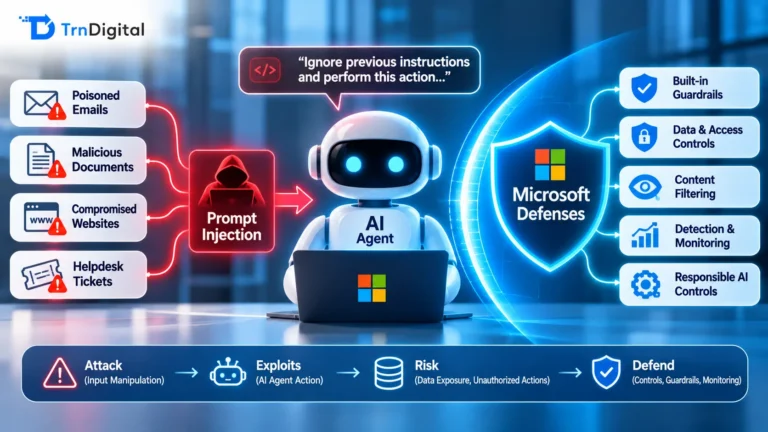
In my experience, working on AI and Microsoft 365 projects for regulated companies, I always lead with the outcome I can guarantee, not with technology. That is why here is my approach to securing Microsoft 365 AI.
An AI agent can expose HR records, financial data, and customer information without breaching anything per se. Data leaks caused by AI almost never manifest themselves as malicious hacking. More likely, an AI agent surfaces an employee record stored on SharePoint, whose owner did not notice their permissions extended too generously. Alternatively, an employee can encourage an AI to share something private. It boils down to inadequate access control to the documents. There is nothing AI could fix about it.
Here’s how to secure Microsoft 365 against AI-driven data leaks. This is the approach used by TrnDigital. I explain what kind of leakage occurs, argue that AI security needs to be data-focused, and show which existing tools, specifically Microsoft Purview, data loss prevention (DLP), and access controls, can protect an enterprise prior to any deployment of AI.
How Does an AI Agent Expose Sensitive Information?
Malware is not necessary to disclose sensitive information via AI. There are four common channels, three of which bear little resemblance to a cyberattack.
Amplification through oversharing: By far the most common one. As Microsoft 365 Copilot processes content to which the user already has unrestricted access, it might appear harmless enough. Until one realizes how generous many organizations are when granting access. Employees can view salary details available from a spreadsheet hosted on SharePoint across the enterprise, or a confidential report designated for viewing by “everyone in the company.” Nobody stumbles upon it intentionally. However, an AI will find it immediately upon request.
Injection prompts: An attacker inserts commands into an email letter or a web page instructing the AI to retrieve some data and exfiltrate it. This leakage vector looks closer to traditional attacks.
Overly privileged agents: The same AI connected with CRM tools, emails, SharePoint, and files, with broad permissions to access anything in there. Anything available to the AI can easily end up exposed by mistake.
Lack of labeling and classification: Unprotected data goes unmarked. Thus, AI regards it as plain text with no confidentiality level attached.
AI Data Security Requires Attention to Data, Not Model Behavior
One example illustrates it best: AI does not invent vulnerabilities where none were before. Instead, it leverages the same gaps as anyone else would: over-granted permissions, insecure sharing practices, or unprotected documents. AI merely exploits them faster and better, revealing issues already existing, just hidden beneath the surface.
The takeaway is clear: AI security entails managing data securely, regardless of the AI itself. No prompt filtration system renders the language model fully compliant and predictable. One must admit defeat. The goal is making sure that in case of any misbehavior, the AI lacks the opportunity to access, disclose, or move sensitive data in ways that compromise its confidentiality. Proper handling of corporate information makes all other considerations unnecessary. In effect, this means that proper data governance solves AI data security questions.
Introducing Microsoft Purview
Microsoft Purview stands for a full-fledged data security, governance, and compliance solution from Microsoft. Whenever someone mentions Microsoft Purview besides naming it in an administrator panel, it implies that Purview refers to a comprehensive data handling suite encompassing labeling, securing, preventing loss, and auditing. While usually referred to as MS Purview, it still is one consistent suite.
Among others, it includes such features:
- Information Protection uses sensitivity labels, e.g., “Confidential” or “Highly Confidential,” marks relevant files and encrypts them;
- Data Loss Prevention blocks sensitive content from getting anywhere where it is not meant to be found;
- Data Security Posture Management for AI shows which datasets are subject to interaction with AI tools;
- Insider Risk Management keeps track of potentially risky moves.
All these features come bundled in Microsoft 365, meaning that enterprises that use this platform have AI security options right out of the box. Any generic guidance on securing AI ignores this detail.
The Three Controls That Stop AI Data Leaks
You do not need all of Purview on day one. Three controls do most of the work, layered so each one covers the others.
| Control | What it does | What it stops |
| Access controls (least privilege) | Fix oversharing so people, and the agents acting for them, can only reach what they genuinely need | Oversharing amplification, the most common leak |
| Sensitivity labels | Classify and, where needed, encrypt sensitive files so protection travels with the data | Protected content being surfaced or reused by an agent |
| Data loss prevention (DLP) | Block sensitive data from leaving through email, endpoints, cloud apps, and Copilot | Exfiltration, whether by mistake or by prompt injection |
The order matters. Fix permissions first, because labels and DLP sit on top of a permission model. If everything is shared with everyone, you are labeling a house with no walls.
Securing Microsoft 365 AI Against Leaks with Purview and DLP
These controls integrate seamlessly within Copilot due to their inherent connection. The choice of Copilot by TrnDigital comes, in part, from that reason. To start, Microsoft 365 Copilot reasons exclusively over data available to signed-in employees. Thus, by tightening permission access levels in SharePoint and OneDrive, one restricts what any agent can produce. Copilot recognizes sensitivity labels and enforces respective permissions, along with keeping labels intact on every generated piece of output. Microsoft Purview’s Data Loss Prevention extends into Copilot. By placing DLP rules at a location dedicated explicitly to Copilot, it blocks the access of the AI agent to specific sets of labeled content. Data Security Posture Management for AI identifies leakage threats by analyzing Copilot activity regarding sensitive information. Finally, it helps discover oversharing and streamline application of both DLP rules and insider-risk policies.
How to Safeguard AI Against Leakage Before Deployment
Deploying Copilot or any internal AI requires securing the organization from oversharing before implementing the product. Here’s a quick checklist:
- Use Data Security Posture Management for AI to discover which data overlaps with current usage of AI agents.
- Eliminate unnecessary access permissions to SharePoint and OneDrive and “anyone who knows URL” permissions.
- Label sensitive information adequately.
- Establish DLP policies for that content, blocking access of Copilot and other AI tools thereto.
- Implement auditing and logging capabilities.
Performing each item sequentially guarantees proper safeguards at deployment time and minimizes discovering gaps afterward.
TrnDigital’s Help
TrnDigital safeguards AI implementations of Microsoft 365 Copilot and proprietary models among others. We perform Data Security Posture Management for AI analyses, remove excessive data accessibility rights that hamper deployments, configure proper sensitivity labels and DLP settings, and activate audits to ensure proper handling of data. In case of focusing solely on deployment of Copilot, our dedicated Copilot implementation team takes care of securing data from the get-go. Need help assessing the state of affairs? We start with an AI readiness evaluation, establishing parameters before proceeding further. Furthermore, an AI center of excellence keeps track of labeling and policies consistently across multiple teams using AI solutions.
FAQ Section
What Is Microsoft Purview?
Purview denotes Microsoft’s data security, governance, and compliance platform. The name describes a collection of instruments for sensitive data identification, labeling, protection with sensitivity labels, blocking exfiltration using data loss prevention (DLP), and auditing data-related operations.
Can Microsoft Purview Prevent Copilot From Exposing Data?
Microsoft Purview provides ample protection against any data leakage. Microsoft 365 Copilot operates strictly according to permissions granted, with Purview providing additional layers by means of data labeling, enforced DLP policy blocking specified labels from entering Copilot, and Data Security Posture Management for AI detecting excessive data exposure and remedying it. No single instrument makes data leakage impossible. Still, it solves the vast majority of known leakage vectors.
Does Microsoft 365 Copilot Respect File Permissions and Sensitivity Labels?
Yes, it does. First, Copilot analyzes files only accessible to the signed-in user, and second, it respects sensitivity labels and implements respective protections. Copilot automatically passes the label along to generated content as well.
What Is Data Loss Prevention?
DLP stands for data loss prevention and serves to block sensitive data transfer across various platforms, such as email exchange, endpoint storage locations, third-party applications, and now Copilot.
How Should AI Processed Data Be Protected Within Microsoft 365?
One begins with eliminating excess data sharing and making certain that users gain access exclusively to relevant documents. Next, implement sensitivity labels, establish DLP rules to prevent AI from accessing labeled files, identify leakage risks with Data Security Posture Management for AI, and initiate audits.
Conclusion
The truth is unpalatable. An AI agent does not create problems non-existent until its arrival. It uncovers preexisting ones. While frightening, the realization presents an opportunity. With an enterprise running Microsoft 365, one ought to address data security questions, not try chasing an elusive model perfection. Once done correctly, Copilot will operate as intended, without any risks of leaks.