
PoC implementations work fine while still in proof-of-concept phase, but they fall apart when going live. It’s got nothing to do with the underlying language model’s fidelity either. Instead, there’s document drift.
Every time an SOP guide, a leave form template, a product price list or similar gets updated and/or archived, its old and inaccurate version lives on inside your vector database next to its new revision. Your model starts serving contradictory statements. Easy enough to spot the root cause of this problem.
How To Fix It: Officially Recommended Microsoft Azure AI Event Grid Sync Pipeline For RAG Deployment
Based on official recommendations by Azure AI Foundry at Microsoft. This approach scales reliably in production environments. Key Considerations for IT Managers on Production RAG Deployment Issues
Scenario A: Creation of Documents
Problem: Your chatbot doesn’t know anything about SOP procedures or other internal policies until your daily indexing job finishes.
Scenario B: Modification of Existing Documents
Problem: Upon leave days increasing from 15 to 20, you now have two documents with different entitlement numbers. Vector database will show contradictory facts. Again, obvious problem here.
Scenario C: Retired Documents
Problem: Outdated datasheets and expired security guides become retired and purged from the cloud storage, but remnants of those dead docs continue to live in your vector database.
Production-Level RAG Pipeline Implementation
Don’t waste compute cycles with scheduled scans. Implement an asynchronous event-based system to incrementally index your docs. Much more efficient.
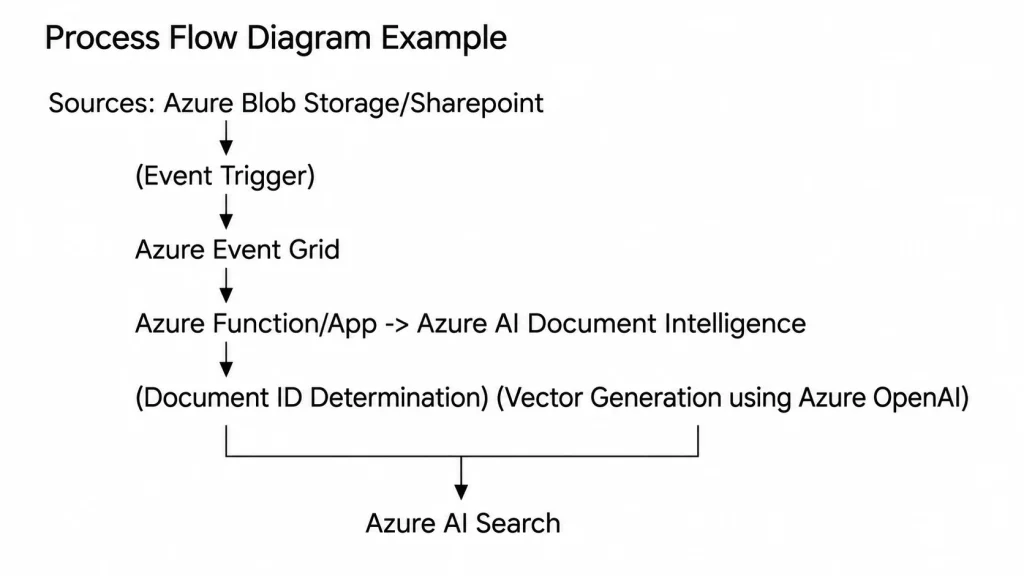
Azure Event Grid: Events get fired whenever documents get created, modified, or deleted, firing blob creation/deletion/events. Deterministic ID: Every indexed chunk receives a deterministic ID (Document ID, Timestamp and Order).
Best Practices For Managing RAG Invalidation And Vector Pruning
- Atomic Document ID Change: Update the document ID in case of amendments to your doc. Mark previous data blocks as invalid using metadata deletion queries against a certain ID key.
- Vector Purge: Remove stale vectors referring to retired document IDs by eliminating document ID tags from vector database indexes.
- Additional Advice for Data Protection Officers and Chief AI Officers
- Duplicate Removal: Check and delete duplicates of internal documents stored in vector database.
- Switch To Async: Move your vector processing pipeline away from nightly jobs towards asynchronous workflows via event grid webhooks.
- Zero Trust Filters: Make sure every query served up by your RAG implementation contains relevant ACL flags matching the version of each document.